Ingress Controler
Introduction
Un contrôleur Ingress dans Kubernetes est un composant qui fournit une interface entre le réseau externe et les services internes à un cluster Kubernetes. Il permet de router le trafic vers les services en fonction de leur nom de domaine, de leur chemin d'accès ou d'autres critères.
Plus précisément, un contrôleur Ingress est responsable des tâches suivantes :
- routage en fonction d’un nom de domaine (app.com et api.app.com)
- routage en fonction d’une chemin (app.com/, app.com/api/)
- gestion des certificats SSL
- configuration fine du reverse proxy (cache, authentification, etc)
- etc
Installation
helm repo add ingress-nginx https://kubernetes.github.io/ingress-nginx
helm repo update
helm upgrade --install ingress-nginx ingress-nginx/ingress-nginx --atomic --cleanup-on-fail --namespace ingress-nginx --create-namespace
Vérification
kubectl get svc,pods --namespace ingress-nginx
NAME                                         TYPE           CLUSTER-IP       EXTERNAL-IP     PORT(S)                      AGE
service/ingress-nginx-controller             LoadBalancer   10.104.201.232   172.31.10.200   80:31319/TCP,443:31562/TCP   9m35s
service/ingress-nginx-controller-admission   ClusterIP      10.103.155.138   <none>          443/TCP                      9m35s

NAME                                            READY   STATUS    RESTARTS   AGE
pod/ingress-nginx-controller-798796947c-x98gr   1/1     Running   0          9m34s
Vérification du bon fonctionnement
Attention
Ce test fonctionne uniquement si vous avez installé Metall LB et le Ingress Controler
Déployement du test
cat << EOF > dpl-test-ingress.yaml
---
# Création d'un namespace 'test-ingress'
apiVersion: v1
kind: Namespace
metadata:
  name: test-ingress
---
apiVersion: apps/v1
kind: Deployment
metadata:
  name: dpl-test-ingress
  namespace: test-ingress
  labels:
    app: hello-world
spec:
  selector:
    matchLabels:
      app: hello-world
  replicas: 2
  template:
    metadata:
      labels:
        app: hello-world
    spec:
      containers:
      - name: hello-world
        #image: scottsbaldwin/docker-hello-world:latest
        image: nginxdemos/hello:latest
        ports:
        - containerPort: 80
---
# Création du service
apiVersion: v1
kind: Service
metadata:
  name: svc-hello-world
  namespace: test-ingress
spec:
  selector:
    app: hello-world
  ports:
    - port: 8088
      targetPort: 80
  type: ClusterIP
---
# Création de l'ingress
apiVersion: networking.k8s.io/v1
kind: Ingress
metadata:
  name: ing-hello-world
  namespace: test-ingress
  #annotations:
  #  kubernetes.io/ingress.class: "nginx"
spec:
  ingressClassName: nginx
  rules:
  - http:
      paths:
        - path: /
          pathType: Prefix
          backend:
            service:
              name: svc-hello-world
              port:
                number: 8088
EOF
kubectl apply -f dpl-test-ingress.yaml
Teste
ip_externe=$(kubectl get svc ingress-nginx-controller -n ingress-nginx --template="{{range .status.loadBalancer.ingress}}{{.ip}}{{end}}")
echo "IP externe: $ip_externe à définir dans le fichier host ou dans le DNS"
Via curl
curl -s http://$ip_externe | grep name
<p><span>Server name:</span> <span>dpl-test-ingress-7bfff68cd-gx7ww</span></p>
Via navigateur
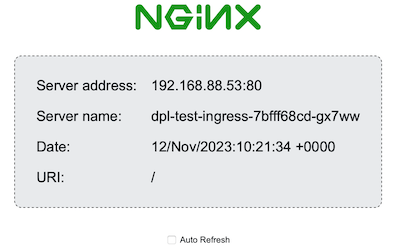
Taper l'url http://172.31.10.200 dans votre navigateur préféré.
Note
172.31.10.200 correpond à l'adresse IP externe ($ip_externe)
 .
.
Tip
Si vous cliquez sur Auto Refresh vous verrez changer l'adresse ip (Server address) et le nom du serveur (Server name). Preuve que le load balancer fonctionne
Désinstallation du test
kubectl delete -f dpl-test-ingress.yaml
Désinstallation du contrôleur Ingress
helm uninstall ingress-nginx -n ingress-nginx
kubectl delete ns ingress-nginx
Sources
Ingress Controler
Deploy Ingress controler
| Version | Date | Change | Auteur |
|---|---|---|---|
| 1.0 | 12.11.2023 | Création | GMo |